Architecture
The SeDuCe dashboard is a web application which contains several sub services:
- frontend
- api
- influxdb
- pdu_crawler_z1_10
- pdu_crawler_z1_11
- pdu_crawler_z1_20
- pdu_crawler_z1_21
- pdu_crawler_z1_40
- pdu_crawler_z1_41
- pdu_crawler_z1_50
- pdu_crawler_z1_51
- temperature_registerer
- sensors_crawler
- modbus_crawler_entech
- modbus_crawler_inrow
- poe_crawler
- redis
- celery_beat
- celery_worker
All theses services are run through supervisord, which read a configuration file in /etc/supervisord.conf based on the example configuration file.
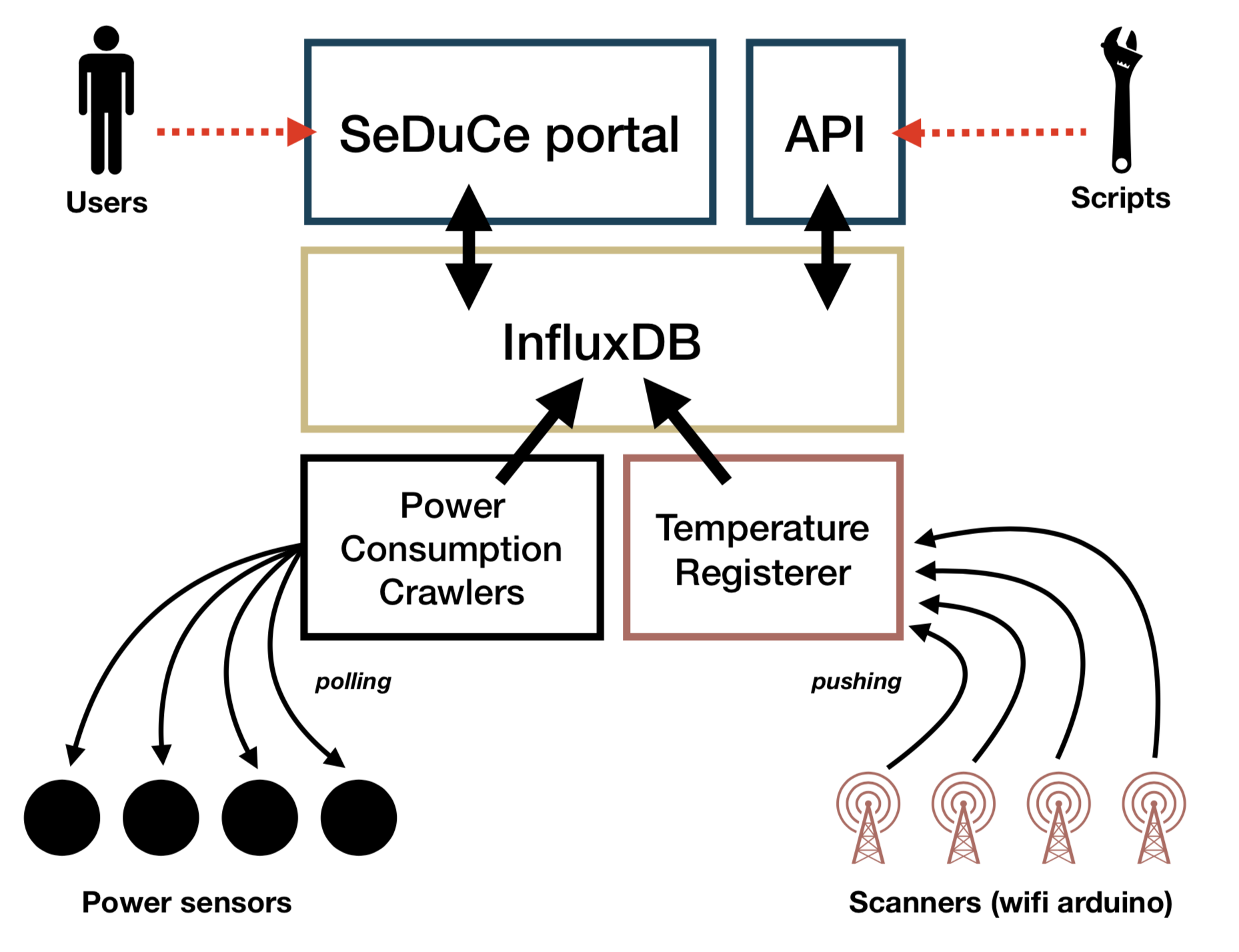
The overall architecture of the dashboard follows quite the functional architecture depicted by this Figure:
SeDuCe portal
The services in charge are:
- frontend
This service is in charge of serving a web UI to users of the SeDuCe testbed. It is developed using the python Flask framework and consist of monolithic web applications composed of several blueprints.
The executable of this service is located in bin/app.py and the resulting web app is available at dashboard.seduce.fr.
SeDuCe API
The services in charge are:
- api
This service is in charge of serving an API to enable users to use the SeDuCe testbed. It is developed using the python Flask framework integrated with the flasgger framework to generate Swagger documentation.
The executable of this service is located in bin/app.py and the resulting web app is available at api.seduce.fr.
InfluxDB
The services in charge are:
- influxdb
All the data regarding metrics collected in the SeDuCe system are stored in an InfluxDB database.
The following rules have been used to integrate SeDuCe with influx:
- each sensors stores its related values in the
sensorsserie, with a tag corresponding to its name. For example, values of sensorsecotype-1_pdu-Z1.50is stored in the following location:sensors,location=ecotype-1,sensor=ecotype-1_pdu-Z1.50,sensor_type=wattmeter,unit=W, which corresponds to:- serie:
sensors - tags:
location=ecotype-1,sensor=ecotype-1_pdu-Z1.50,sensor_type=wattmeter,unit=W
- serie:
- data from
sensorsare aggregated every 30s, 1m, 1h, 1d in series calledmeasurement_downsample_1m,sensor=ecotype-1_pdu-Z1.50measurement_downsample_1h,sensor=ecotype-1_pdu-Z1.50measurement_downsample_1d,sensor=ecotype-1_pdu-Z1.50
- to ease the development of tree visualisation, data from power consumption and power production sensors are aggreagated by continuous queries in:
cq_battery1_30scq_battery1_1mcq_battery1_1hcq_battery1_1d
Power consumption crawlers
The services in charge are:
- pdu_crawler_z1_10
- pdu_crawler_z1_11
- pdu_crawler_z1_20
- pdu_crawler_z1_21
- pdu_crawler_z1_40
- pdu_crawler_z1_41
- pdu_crawler_z1_50
- pdu_crawler_z1_51
- poe_crawler
- modbus_crawler_inrow
These services are based on implementations located in:
Temperature Registerer
The services in charge are:
- temperature_registerer
The temperature_registerer is a Flask web application that receives HTTP requests from arduino cards connected to temperature sensors.
The implementation of the temperature_registerer is based on bin/temperature_registerer.py
Entech crawler
The service in charge of collecting metrics from Entech's control board is called:
- modbus_crawler_entech
The implementation is based on bin/modbus crawler.py.
Periodic tasks system
The periodic tasks system uses the following services:
- redis
- celery_beat
- celery_worker
The periodic task system leverages celery in the following way:
redisis used as a storage system for the inner state of celery, and as a publish/subscribe systemcelery_beattriggers periodically functions that should be executed by workerscelery_workerreacts to events triggered bycelery_beatand executes some functions.
In SeDuCe, we have the following periodic tasks defined in bin/celery_tasks.py:
send_confirmation_email: checks if a user needs to receive an email that would enable him to confirm his email account.send_authorization_email: checks if a user has confirmed its email by clicking the link contained in the email sent by thesend_confirmation_emailtask.detect_unresponsive_temperature_sensors: checks how long a sensor has been unresponsive, and if it is over a threshold, it increases an error counter associated to the sensor and stored on redis.run_job: checks if continuous query recomputation job is waiting to be executed (createdorwaitingstates). It prepares the parameters (time interval) for the next execution and mark the job as waiting for its execution.wait_job: checks if continuous query recomputation job should be running (runningstate). It runs the query with the parameters (time interval) decided byrun_job.finish_job: checks if continuous query recomputation job is waiting (waitingstate) and checks if all the time interval has been processed. If this is the case, it marks the jobs as finished.
Database
The SeDuCe platform uses a relational database to store some of its states. The database is used with the ORM SQLAlchemy, and we currently uses sqlite as database backend.
The database contains two types of objets which both act as finite state machines: